Vulnerabilities
The Vulnerabilities page lists every known security advisory affecting a version in your registry, so you can see your exposure across all ecosystems in one place. Advisories come from the OSV database. For CVSS, EPSS, KEV, and other terms, see the Glossary.
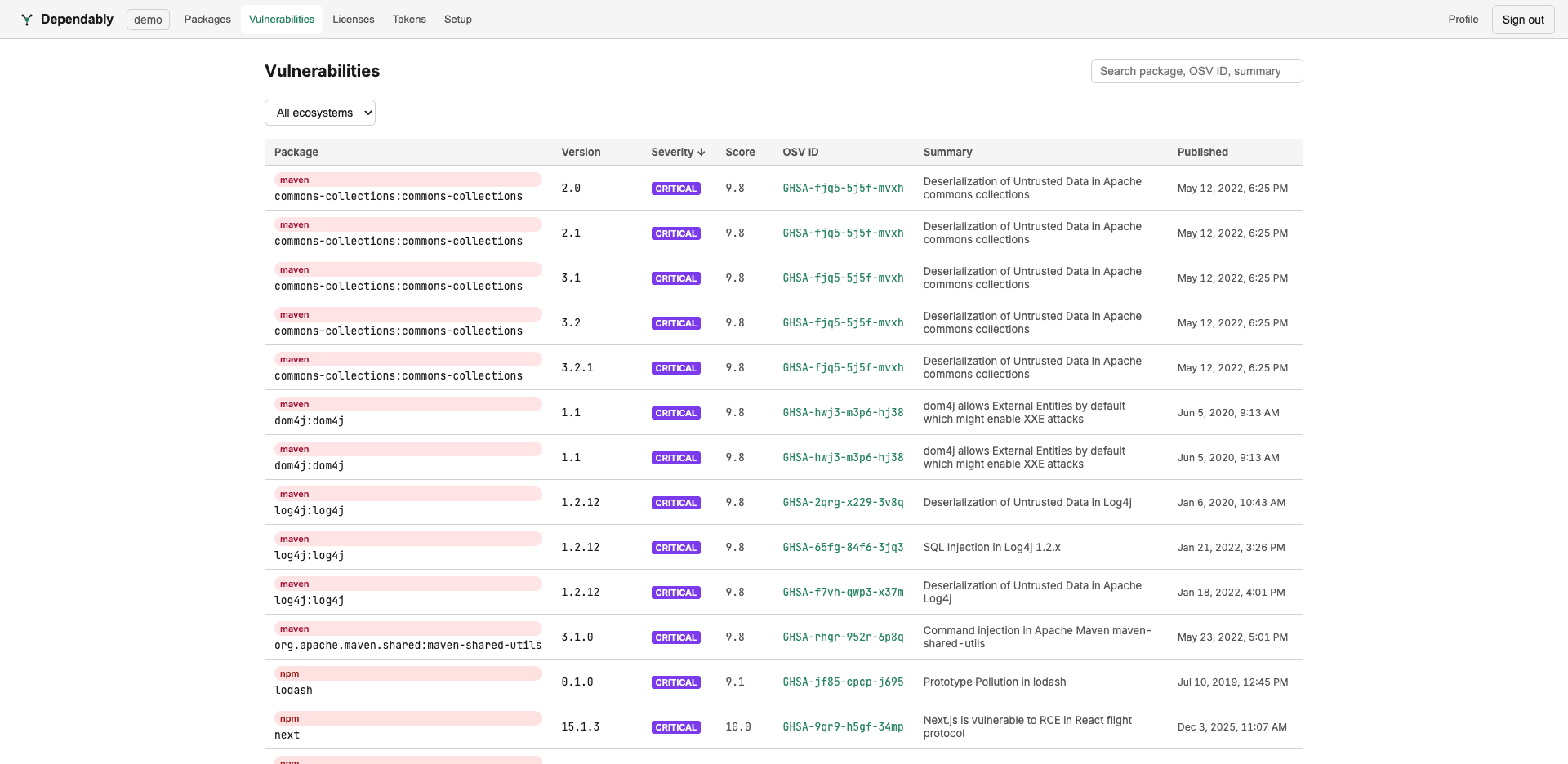
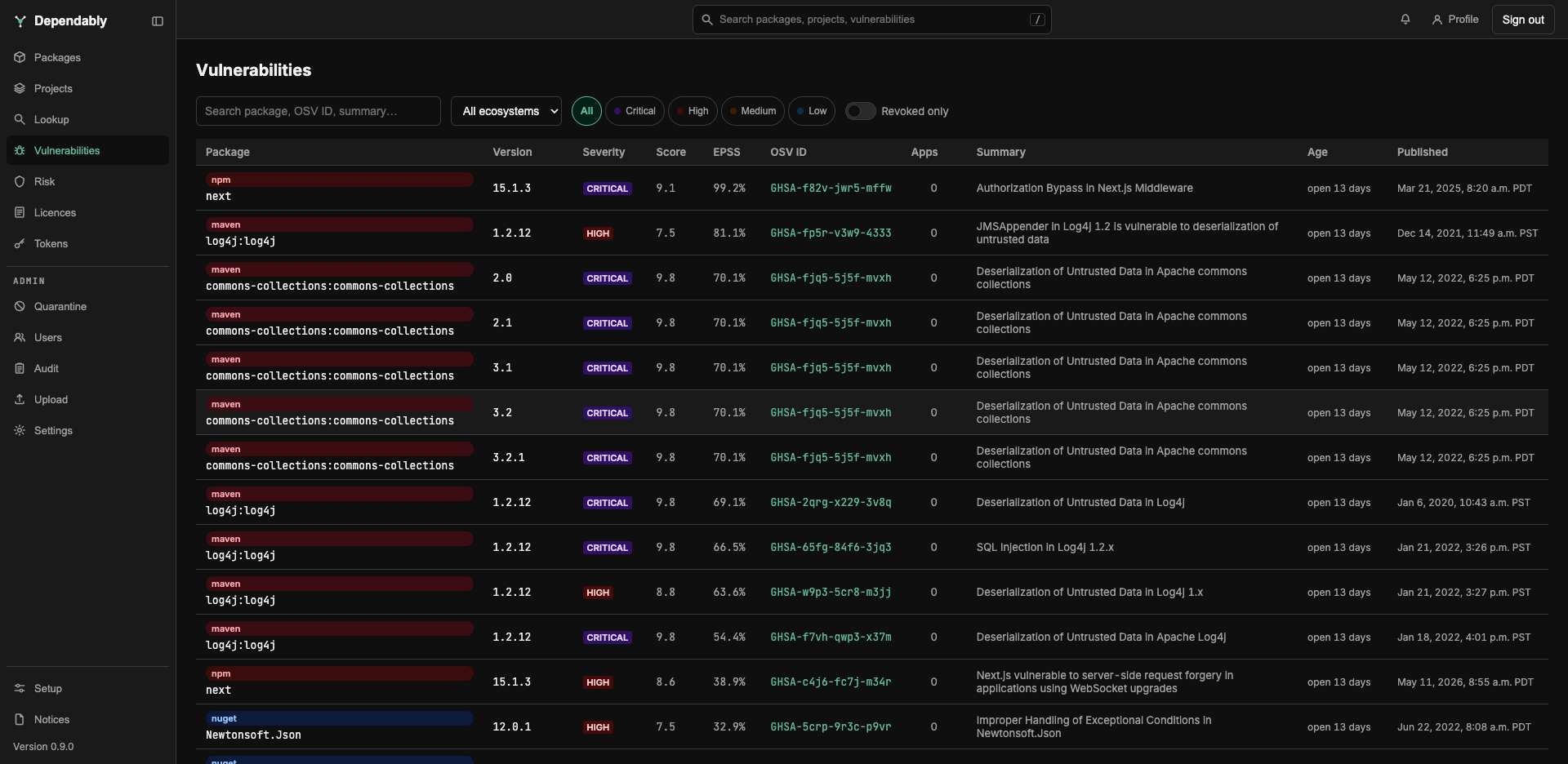
Find an advisory
- Search by package name, version, OSV ID, or summary text.
- Filter by ecosystem with the dropdown, by severity with the Critical, High, Medium, and Low chips, or show Revoked only.
- Sort by selecting a column header. The list opens in risk order: advisories in the CISA Known Exploited Vulnerabilities Catalog first, then by exploitation probability, then by CVSS score. That order is not a column sort, so no header is highlighted until you choose one.
- Page through results at the bottom; choose 20, 50, 100, or 200 rows per page. The search, filters, sort, and page are kept in the page address, so a copied link opens the same view. Revoked only is the exception: it is not kept, and it narrows only the rows already on the current page.
| Column | Meaning |
|---|---|
| Package | The affected package, with its ecosystem badge. |
| Version | The specific cached version the advisory applies to. A revoked badge means the version has disappeared from the upstream registry. That is a lifecycle signal rather than a vulnerability, though a takedown can indicate a compromised release. |
| Severity | Critical (CVSS 9.0 and above), High (7.0 to 8.9), Medium (4.0 to 6.9), or Low (below 4.0). A KEV badge marks an advisory in the CISA Known Exploited Vulnerabilities Catalog, and KEV · Ransomware an entry CISA has tied to ransomware campaigns. MALICIOUS marks an OSV MAL- report, a verdict that the package itself is malicious, not a score: remove such a package rather than looking for a fix. |
| Score | The CVSS base score, taken from the advisory or computed from its vector, or a dash when the advisory has none. |
| EPSS | The probability, as a percentage, that the vulnerability is exploited in the wild within the next 30 days. Refreshed daily. Use it to rank which High you fix first. |
| OSV ID | The advisory identifier (for example GHSA-…), linking to its record on osv.dev. |
| Apps | How many of your projects ship the affected package in their latest version. A dash means the count could not be loaded, not zero. |
| Summary | A one-line description of the issue. |
| Age | How many days the advisory has been open against this version. |
| Published | When the advisory was published. |
An advisory with no score is unscored, not safe. It shows no severity band and never meets an alert threshold. Read it and judge it yourself rather than reading the empty band as a clean result.
Read one advisory
Select a row to expand it. From the top:
- Copy remediation brief: a Markdown summary of the advisory, the affected package and versions, the weakness classes, and the recommended skill, ready to paste into a ticket or an assistant.
- When it was checked, published, and modified, the EPSS value, the KEV badge, and links to the OSV record and, for a CVE, to NVD.
- Applications affected: which projects ship the package.
- Aliases and Related advisories, each linked to its home database: GHSA to the GitHub Advisory Database, CVE to NVD, RUSTSEC to rustsec.org, GO to pkg.go.dev, and PYSEC to osv.dev.
- References, then the Remediation section described below, then the Affected ranges, Credits, the advisory's full Details, and the raw database-specific data.
Remediation
- Fixed in: the version to upgrade to. Dependably resolves the fix of the affected range containing your installed version, using the ecosystem's own version ordering for npm, PyPI, NuGet, Maven, Cargo, Terraform, and Hex. For RPM, Docker, Go, and Alpine apk it falls back to the first fixed version the advisory names.
- CWE chips list the Common Weakness Enumeration classes the advisory carries, linked to cwe.mitre.org and each mapped to its OWASP Top 10:2025 category, the background reading on what the class is and how to prevent it structurally.
- Fix with your AI agent: a curated remediation playbook, below.
Fix it with an AI assistant
A skill is a Markdown playbook an AI coding assistant follows. Your instance serves the skills below, and shows the ones that match what the advisory carries:
| Skill | Applies when |
|---|---|
fix-vulnerable-dependency |
Any advisory with a fixed version. A lockfile-aware upgrade recipe, direct and transitive, per ecosystem |
fix-injection |
SQL, command, LDAP, XPath, and code injection |
fix-xss |
Cross-site scripting |
fix-path-traversal |
Path traversal and symlink following |
fix-ssrf |
Server-side request forgery |
fix-unsafe-deserialization |
Unsafe deserialization and mass assignment |
fix-broken-access-control |
Missing or incorrect authorization and insecure direct object references |
fix-weak-cryptography |
Outdated algorithms, hard-coded keys, and non-cryptographic randomness |
fix-authentication-failures |
Broken or missing authentication, rate limiting, certificate and session validation |
The playbook itself is assistant-neutral. Pick your assistant in the remediation section and the install command adapts:
| Assistant | Installs to | Invoked |
|---|---|---|
| Claude Code | ~/.claude/skills/<id>/SKILL.md |
discovered by name |
| OpenAI Codex | ~/.codex/prompts/<id>.md |
/<id> |
| GitHub Copilot | .github/prompts/<id>.prompt.md, in your repository |
/<id> |
The Install skill one-liner needs no token, because the endpoint it fetches from is anonymous. The Prompt beside it is pre-filled with the advisory ID, the affected package, your installed version, and the resolved fixed version; paste it into the assistant after installing. Without an assistant, open the same URL and follow the recipe by hand: the playbooks are plain Markdown.
What an advisory does and does not do
Seeing an advisory here does not by itself stop the version being served. Whether a vulnerable version is blocked depends on your organization's supply-chain gates (vulnerability score, KEV, EPSS, malware). Those gates, and the scores they key on, are set by an administrator in Settings. Versions a gate has blocked wait in the Quarantine queue for an administrator's decision; a package manager refused a download sees a blocked package. This page has no block or allow controls: administrators and owners block or allow a version on the package page.
On an air-gapped instance, advisories come from the local OSV mirror. The KEV and EPSS feeds are not fetched there, so no KEV badges appear and the EPSS column stays empty.