Connect a package manager
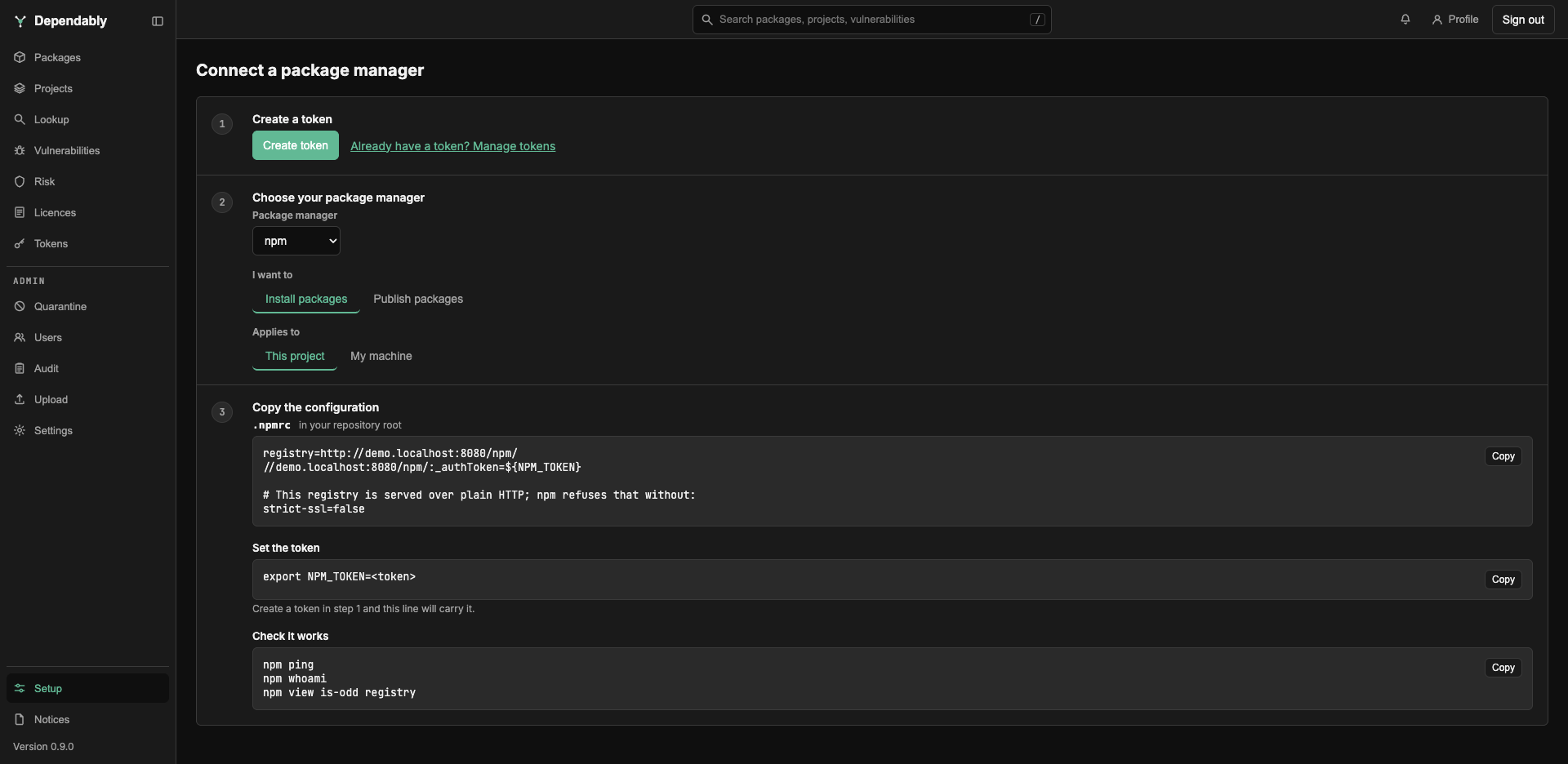
The Setup page, at the bottom of the sidebar, walks you from nothing to a working package manager, one numbered step at a time: say what you are doing and create a token, choose your package manager, and copy the result. The configuration is already filled in with your instance's address, so there are no URLs to hand-edit.
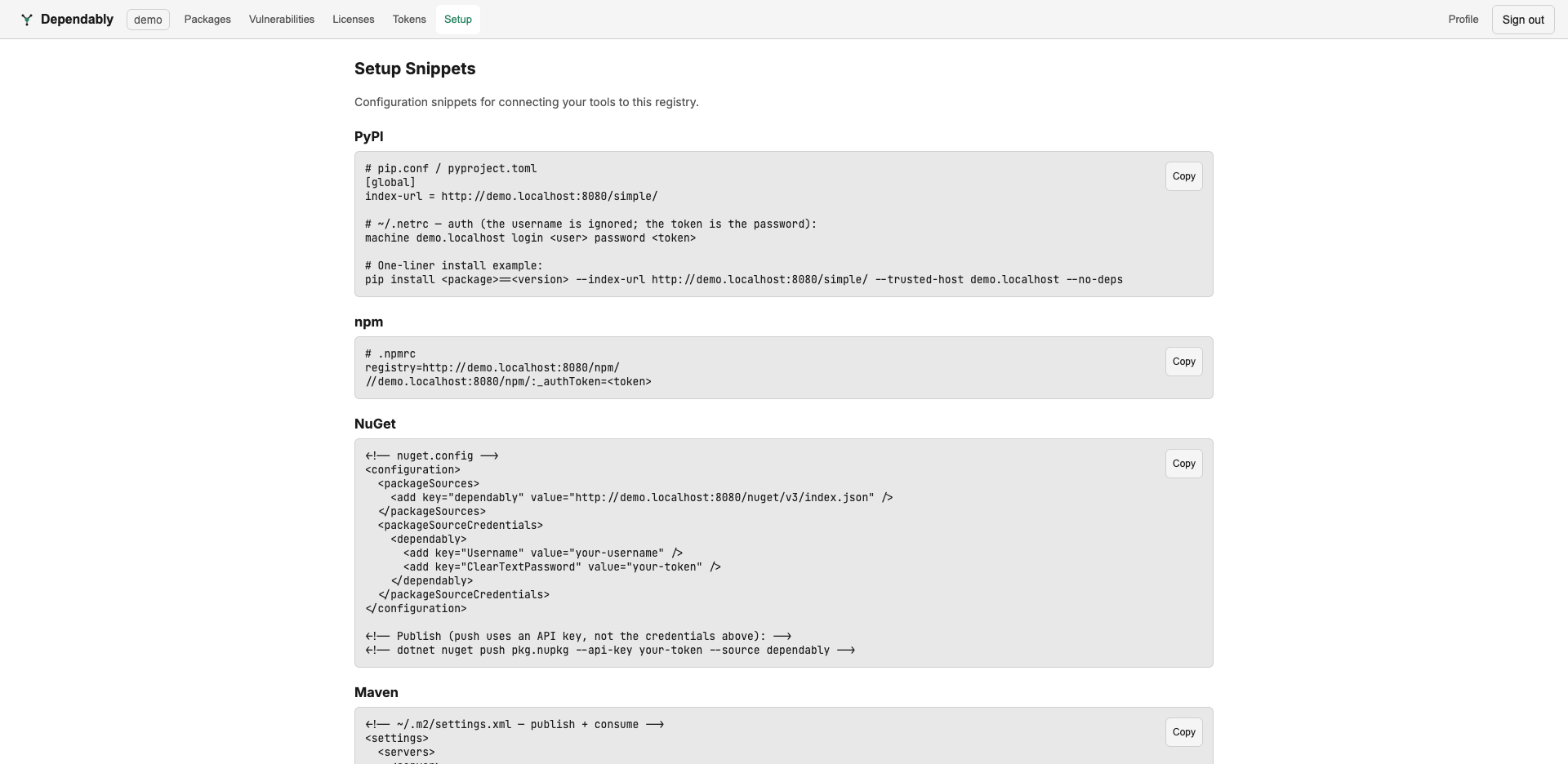
1. Choose what you are doing, and create a token
Under I want to, pick Install packages or Publish packages. Go, Alpine apk, and Terraform are install-only on the registry, and the page says so. Publishing needs the Admin or Owner role; for a member, creating a publish token is refused.
Select Create token. The wizard creates a personal token with the scope that matches your choice (pull for installing, push for publishing) and a description of Install packages or Publish packages, so you can find it in your token list. The token has no expiry. It is shown once, with the message Copy this now — it is not shown again. Manage it later from Tokens.
Already have one? Already have a token? Manage tokens takes you to the Tokens page instead. If you created an install token and then switch to publishing, a warning says the token is read-only; select Create a different token.
2. Choose your package manager
Package manager offers PyPI, npm, NuGet, Maven, RPM, Docker, Go, Cargo, Alpine apk, Terraform, and Hex.
3. Copy the configuration
The step opens with the choices that shape the file:
- Applies to: This project (a file committed with your code that reads the token from an environment variable) or My machine (a file in your home directory that holds the token in clear text and stays out of source control). Docker, RPM, Alpine apk, Terraform, and Hex offer only My machine.
- Tool, shown when the ecosystem has more than one: pip, Poetry, uv, or twine for PyPI; Maven (pom.xml), Gradle (build.gradle), or Gradle (build.gradle.kts) for Maven; Elixir (Mix) or Erlang (Rebar3) for Hex.
The result comes in parts, each with a Copy button. First is the file: its
name, where it goes (in your repository root, in your workspace root, in
your home directory, or on each developer's machine, not committed), and
its contents. A file that holds the token in clear text carries a reminder to
keep it out of source control and restrict its permissions. Set the token
is the line that hands the token to the tool, filled in with the token from
step 1: an export line for tools that read an environment variable, which
lasts only for the terminal you run it in, or the tool's own login command.
It is absent when the file already holds the token. Check it works is the
command that proves the tool is talking to your registry.
Where a package manager needs a note before you paste, it appears above the file. On an instance served over plain HTTP:
- Maven 3.8.1 and later refuse the repository unless you serve it over HTTPS
or add a mirror declaring
blocked=false. - Terraform rejects an
http://mirror outright. - Docker refuses the registry until the daemon opts in through
daemon.json. - Go, RPM, and Alpine apk warn that the token travels in clear text.
Tools with a username field are told that any value works, because Dependably authenticates on the token alone.
Below the configuration, Or configure it with an AI assistant offers the curated skill for the package manager, when your instance ships one. The page's Remediation skills tab lists the skills for fixing a vulnerability; see Fix it with an AI assistant.
What each package manager gets
The examples use repo.example.com; the page shows your real host.
| Package manager | Install file | Registry URL | Check it works | Publish with |
|---|---|---|---|---|
| PyPI | pip.conf or pyproject.toml (project); ~/.config/pip/pip.conf (machine) |
https://repo.example.com/simple/ |
pip install requests |
twine, with ~/.pypirc |
| npm | .npmrc |
https://repo.example.com/npm/ |
npm ping, npm whoami |
npm publish |
| NuGet | NuGet.config (project) or dotnet nuget add source (machine) |
https://repo.example.com/nuget/v3/index.json |
dotnet restore |
dotnet nuget push --api-key <token> |
| Maven | pom.xml or build.gradle / build.gradle.kts, plus ~/.m2/settings.xml |
https://repo.example.com/maven/ |
mvn dependency:resolve |
mvn deploy or ./gradlew publish |
| RPM | /etc/yum.repos.d/dependably.repo |
https://repo.example.com/rpm/ |
dnf repolist dependably |
curl --upload-file pkg.rpm …/rpm/upload |
| Docker | docker login; daemon.json only for plain HTTP |
repo.example.com/<image>:<tag> |
docker pull |
docker push |
| Go | .envrc setting GOPROXY, plus ~/.netrc |
https://repo.example.com/go,direct |
go mod download |
install-only |
| Cargo | .cargo/config.toml, plus ~/.cargo/credentials.toml |
sparse+https://repo.example.com/cargo/ |
cargo build |
cargo publish --registry dependably |
| Alpine apk | /etc/apk/repositories |
https://user:<token>@repo.example.com/apk/… |
apk update |
install-only |
| Terraform | ~/.terraformrc |
https://user:<token>@repo.example.com/terraform/ |
terraform init |
install-only |
| Hex | Mix: a mix hex.repo add command; Rebar3: ~/.config/rebar3/rebar.config |
https://repo.example.com/hex |
mix deps.get or rebar3 get-deps |
mix hex.publish or rebar3 hex publish |
Go deeper
The wizard is the fast path. Each tool has a full guide covering verify, publishing, and revert steps:
npm · PyPI · NuGet · Maven · Cargo · Go · Terraform · Hex · Docker · RPM